Description
The GeoWidget plugin displays a map in your sidebar that can be used to show where you live. You can use it to show any point on the map; where you work, where your best mates are playing poker, where your idol lives or even where you want to go on holiday. The plugin works both as a widget or as a stand-alone component you can add to your sidebar.
Screenshots
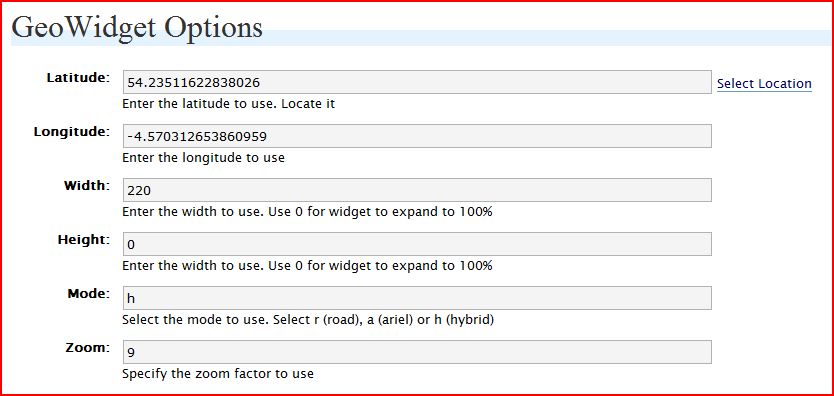 |
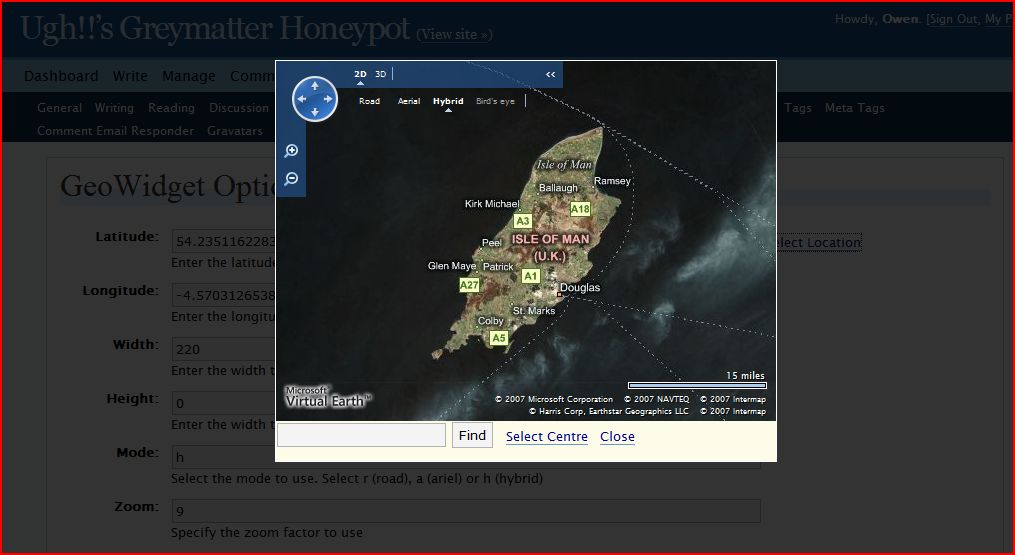 |
Installation
1. Download the plugin file, unzip and place it in your plugin folder.
This makes the plugin available to WordPress and it should now appear in your Plugin folder. The zip file contains all the files you need. Please make sure all files end up in the “GeoWidget” directory.
2. Activate the plugin
This “starts up” the plugin, making it available to your presentation files (you know, the ones that make up your theme). At this point, the plugin is active, but WordPress doesn’t know where it should be displaying GeoWidget.
3a. Add this snippet to your theme: <?php GeoWidget(); ?>
This tells WordPress where to put the map. Place the snippet in the sidebar where you want the map to appear.
3b. Alternatively, the plugin is also widget-aware and will appear in your widget list.
Go to your widget screen and drag the GeoWidget to the place you want it to appear on your sidebar.
4. Configure the plugin
The plugin can be configured both from the widget control area as well as from a new panel in the Options menu. The widget control area lets you key in the details you want, but you’ll need to know the Longitude and Latitude of the point your want to show. If you go to the Options screen, you’ll have an option which pops up a map and lets you search for the point you want to display. (It’s cool, try it out)
Usage
The plugin can be used in one of two ways:If you are using widgets, just drag the widget onto the area of the sidebar where you want it to appear.If you aren’s using widget, add the following code: <?php GeoWidget(); ?> to your template where you would like the button to appear.
Download
Download here: GeoWidget.zip
History
v0.1: Initial release. Let it loose on the world and see what feedback comes back ..
not working for me just get a black bar?
same here.. not working 🙁
I see only double-line box, whats wrong.
Nor me – get the bar but no map. In options: added long and lat manually but still nothing. link to map not working: http://symidream.com/wp-content/plugins/GeoWidget/MapSelect.php gets a page not found error. What am I doing wrong? And some help on mode and zoom wuold be good too!
me too. the “select location” didn’t work either.
i get the two bars, width conigures ok, but no map, no link for map.
Updated version doesn’t work either…
@roger: The problem seems to be a wrong file path. Is there any chance you can allow me administrator access to your blog to debug the issue? If so email me at owen@cutajar.net
@James: The problem seems to be a wrong file path. Is there any chance you can allow me administrator access to your blog to debug the issue? If so email me at owen@cutajar.net
Same problem to me 🙁 just a small black bar …
calin
Try setting up the widget in “widgets” as the initial step – don’t bother with the settings (don’t forget to click update)
Then setup the options in “-options – GeoWidget” and it just might work.
It worked for me, after some tinkering.
It’s not showing a map for me either. Inside the options it is not letting me select location, can only put in lat and long
works.. for 1 time then info is gone and no map
I can’t get it to work at all. When I drag and drop it to the sidebar, I see nothing. Any ideas?